A few years ago I moved my sites from a PHP templating system to static generation using Jekyll. How is it working out?
Pretty well. I’ve had no downtime (that I haven’t caused) which is to be expected on a low-traffic website serving HTML files. Updating content and templates has been easy, with Jekyll remaining simple to use. While I’m sure I’m in need of an update, that is less of a concern than if I was running code exposed to a user. Overall no problems with the technology or maintenance - indeed I find it much easier to work with than previous versions of the site as I don’t have to re-learn my configuration each time I want to do anything more complicated than change some words.
The biggest win - and something I actually considered skipping when I initially implemented - has been with the build scripts. In professional life I wouldn’t think twice about writing automated build scripts for a project but we all know that this kind of thinking isn’t as rigorously followed for personal projects. I wrote a simple mina script for deploying (and updating) my sites and several years on I deeply thankful to my past self. I haven’t had to keep my build process in my brain at all - just the magic command, which is in a README somewhere. This has meant small updates have been easy, the most boring part of site maintenance has all but gone away and consequently those updates have actually happened.
The lesson to take away here is that doing the hard (and dull) work up front of defining a development process and writing deployment scripts was worth it. Not so much because of time saving, or the consistency inherent in an automated process - but because these benefits actually encouraged me to maintain my sites in a way I simply wouldn’t have done had I been required to remember how to deploy my work each time I did anything.
Tuesday, 30 August 2016

Saturday, 30 July 2016
Printing a photo book
TL;DR - I used CEWE Photoworld and it was good
I have been running a photography website since the start of 2015 and I thought it would be nice to turn the pictures from last year into some kind of coffee table photo book. That's 72 photographs (12 months x 6 photographers) each with title and caption, plus each month needed a cover page, and I wanted the first photo of each month to appear on the right-hand page so I needed another page per month to shuffle the photos on. That's 8 pages per month, for a total of 96 pages to lay out - not a small amount of work so I needed a site which would give me a tool which I could use without wanting to do Very Bad Things by the end of it.
After some searching I ended up using CEWE Photoworld for three important reasons:
The desktop tool is hardly the pinnacle of software design, but it does the job. It is quick, reassuringly responsive and allows text with background colour and limited bulk formatting. It let me put everything together in the way I wanted, including guidelines on where I could push content to the edge of pages and where it wouldn't work. This put it a huge step forwards from Photobox, which I tried first because it is the famous one. Photobox offers a web based application which didn't let me add text with a coloured background and generally had that cumbersome feeling of web applications from last decade.
The Photoworld online help includes a real time chat, which was very helpful. I used it twice. The first agent was very responsive and helpful, answering my questions and generally being very reassuring. The second one was significantly less so - I got the impression he had far too many simultaneous conversations running, and was annoyingly vague when I was asking very precise questions (if you've got five different types of paper to choose from then you really can't use terminology which ambiguously covers three of them when recommending a choice). Still, we got there and the site helpfully emailed me a copy of the conversation which I kept just in case I needed to trigger the guarantee at a later date. Fortunately I've not had to test their guarantee in practice, but it was very reassuring to know that I had that safety net.
Reassuring is, I think, the key word for describing dealing with Photoworld. They know their service is expensive (as in book printing is expensive - I don't think they are expensive compared to their competitors) and is likely to be bought by people who haven't got a clue what they are doing so they do their utmost to make you feel like you're in good hands, and minimise the chances you're going to make a mess of what you're doing. One example from the site text - each book passes through 15+ pairs of hands as it is produced so it is thoroughly checked for imperfections. Regardless of how helpful this actually is in reality, it is an encouraging thought.
The only time I feared for my book while using it was when it came to finish and pay. At this point it uploads the pictures and send you off to secure payment, or crashes horribly if you attempt to use the Paypal option. This is slightly frightening when you've spent tens of hours laying everything out and proofing the book and all of a sudden it looks like it might be stuck on your desktop for all of eternity. Anyway, a switch to using a credit card bypassed that part of the application and it all worked fine.
The book arrived slightly quicker than promised and looks great.

The presentational box was an extra, but looks really nice.
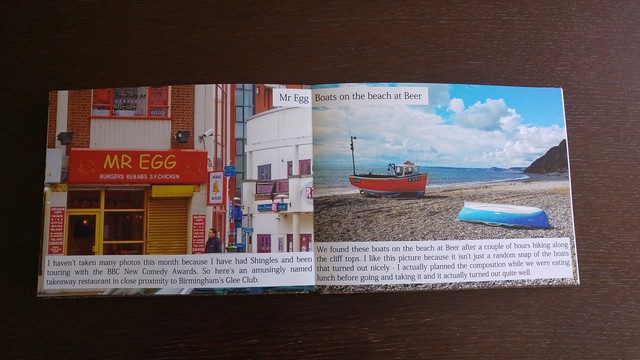
And the photos printed well. There is a notable variance in the quality of the pictures between the different photographers, but that is to be expected, reflecting the different cameras in use.
Overall, I'm impressed. I'll be using Photoworld again.
And a big thank you to Kirsty Davey for proof reading it and correcting my mistakes. If she had a web presence I'd link to it.
I have been running a photography website since the start of 2015 and I thought it would be nice to turn the pictures from last year into some kind of coffee table photo book. That's 72 photographs (12 months x 6 photographers) each with title and caption, plus each month needed a cover page, and I wanted the first photo of each month to appear on the right-hand page so I needed another page per month to shuffle the photos on. That's 8 pages per month, for a total of 96 pages to lay out - not a small amount of work so I needed a site which would give me a tool which I could use without wanting to do Very Bad Things by the end of it.
Photoworld
- They have a desktop tool
- They have an online help which actually ... helps
- They have a 100% satisfaction guarantee
The desktop tool is hardly the pinnacle of software design, but it does the job. It is quick, reassuringly responsive and allows text with background colour and limited bulk formatting. It let me put everything together in the way I wanted, including guidelines on where I could push content to the edge of pages and where it wouldn't work. This put it a huge step forwards from Photobox, which I tried first because it is the famous one. Photobox offers a web based application which didn't let me add text with a coloured background and generally had that cumbersome feeling of web applications from last decade.
The Photoworld online help includes a real time chat, which was very helpful. I used it twice. The first agent was very responsive and helpful, answering my questions and generally being very reassuring. The second one was significantly less so - I got the impression he had far too many simultaneous conversations running, and was annoyingly vague when I was asking very precise questions (if you've got five different types of paper to choose from then you really can't use terminology which ambiguously covers three of them when recommending a choice). Still, we got there and the site helpfully emailed me a copy of the conversation which I kept just in case I needed to trigger the guarantee at a later date. Fortunately I've not had to test their guarantee in practice, but it was very reassuring to know that I had that safety net.
Reassuring is, I think, the key word for describing dealing with Photoworld. They know their service is expensive (as in book printing is expensive - I don't think they are expensive compared to their competitors) and is likely to be bought by people who haven't got a clue what they are doing so they do their utmost to make you feel like you're in good hands, and minimise the chances you're going to make a mess of what you're doing. One example from the site text - each book passes through 15+ pairs of hands as it is produced so it is thoroughly checked for imperfections. Regardless of how helpful this actually is in reality, it is an encouraging thought.
The only time I feared for my book while using it was when it came to finish and pay. At this point it uploads the pictures and send you off to secure payment, or crashes horribly if you attempt to use the Paypal option. This is slightly frightening when you've spent tens of hours laying everything out and proofing the book and all of a sudden it looks like it might be stuck on your desktop for all of eternity. Anyway, a switch to using a credit card bypassed that part of the application and it all worked fine.
Behold
The presentational box was an extra, but looks really nice.
And the photos printed well. There is a notable variance in the quality of the pictures between the different photographers, but that is to be expected, reflecting the different cameras in use.
Overall, I'm impressed. I'll be using Photoworld again.
And a big thank you to Kirsty Davey for proof reading it and correcting my mistakes. If she had a web presence I'd link to it.
Thursday, 30 June 2016
The Brexit post
So, like everyone else with a social media account I have an opinion on Brexit and the chaotic aftermath in which we find ourselves with both the government and the opposition collapsing in on themselves at exactly the time when some actual leadership is required. While I doubt I've much new to add, one day I will look back at this blog and I want to see a collection of my thoughts from this time.
Disclosure first. I believe in the Europe Union and the European vision. I believe that as a nation we are more than this small island and that not only means we should engage with European politics, but we have a responsibility to do so. So yes, I voted Remain.
Obviously I think the referendum result was a terrible decision and I'm appalled at the lack of conviction shown by the winners in the aftermath - be it Boris deciding that after leading Leave, he doesn't want to lead actually leaving or the calls from the Leave camp to put off invoking Article 50 for an unspecified amount of time. The indecision and lack of any coherent plan for this result is, frankly, terrifying.
Remain supporters are trying to process the situation. Some are calling for a second referendum, while others are looking to Scotland to find a magic veto and dig us out of this mess. Still others are looking to claim citizenship of other countries, or leave altogether. There is a hope the government will simply ignore the result, which seems a reasonable reaction, if wishful. It's not like they've listened when it comes to anything else recently.
Many have had enough of all this. They've sat through months of campaigning, of impenetrable rhetoric, half-truths, scaremongering and downright lies and, understandably, just want to get back to normal life. They want cats and babies on their Facebook feeds, not endless discussion of what is seen as a now-closed issue. This resignation hasn't gone down well and others are asserting their right to be angry, leading to a weird meta-argument.
Personally, I'm sympathetic to the weariness. I'm tired of all the debates and all the fighting being about stopping things getting worse. The Remain campaign wasn't about fighting for a better future - it was a rearguard action to defend what was the current (far from ideal) state of affairs from the self-serving and deluded. The same as the battle to stop the NHS being taken to pieces and privatised. And the battle for the BBC. And the schools. And the Snooper's Charter. And so on.
The left does not seem to be fighting for improvements any more. We aren't campaigning for positive change, but opposing negative change which rather plays to the whining liberal stereotype and it is really hard to get gain any kind of momentum when your message is "now, hang on". It is at this point we really need something big and positive we can get behind in the political arena. We should be able to look to the opposition for some kind of balance. Except the opposition has struggled to be credible for the last few years and has just imploded.
This is, of course, an emotional reaction to the current situation. There is a tremendous amount of work done by those who are campaigning for a genuinely better future, and I am doing a disservice to those fighting the rearguard action. But ultimately, major change will need to come through voting in what I am going to crudely call "better people" and that means increasing engagement in a process which for me (someone who is already engaged and interested) is currently a source of helplessness and fatigue. I doubt I am alone in feeling this.
I hope future-me reading back can say that I've played a part in improving this situation.
Disclosure first. I believe in the Europe Union and the European vision. I believe that as a nation we are more than this small island and that not only means we should engage with European politics, but we have a responsibility to do so. So yes, I voted Remain.
Obviously I think the referendum result was a terrible decision and I'm appalled at the lack of conviction shown by the winners in the aftermath - be it Boris deciding that after leading Leave, he doesn't want to lead actually leaving or the calls from the Leave camp to put off invoking Article 50 for an unspecified amount of time. The indecision and lack of any coherent plan for this result is, frankly, terrifying.
Remain supporters are trying to process the situation. Some are calling for a second referendum, while others are looking to Scotland to find a magic veto and dig us out of this mess. Still others are looking to claim citizenship of other countries, or leave altogether. There is a hope the government will simply ignore the result, which seems a reasonable reaction, if wishful. It's not like they've listened when it comes to anything else recently.
Many have had enough of all this. They've sat through months of campaigning, of impenetrable rhetoric, half-truths, scaremongering and downright lies and, understandably, just want to get back to normal life. They want cats and babies on their Facebook feeds, not endless discussion of what is seen as a now-closed issue. This resignation hasn't gone down well and others are asserting their right to be angry, leading to a weird meta-argument.
Personally, I'm sympathetic to the weariness. I'm tired of all the debates and all the fighting being about stopping things getting worse. The Remain campaign wasn't about fighting for a better future - it was a rearguard action to defend what was the current (far from ideal) state of affairs from the self-serving and deluded. The same as the battle to stop the NHS being taken to pieces and privatised. And the battle for the BBC. And the schools. And the Snooper's Charter. And so on.
The left does not seem to be fighting for improvements any more. We aren't campaigning for positive change, but opposing negative change which rather plays to the whining liberal stereotype and it is really hard to get gain any kind of momentum when your message is "now, hang on". It is at this point we really need something big and positive we can get behind in the political arena. We should be able to look to the opposition for some kind of balance. Except the opposition has struggled to be credible for the last few years and has just imploded.
This is, of course, an emotional reaction to the current situation. There is a tremendous amount of work done by those who are campaigning for a genuinely better future, and I am doing a disservice to those fighting the rearguard action. But ultimately, major change will need to come through voting in what I am going to crudely call "better people" and that means increasing engagement in a process which for me (someone who is already engaged and interested) is currently a source of helplessness and fatigue. I doubt I am alone in feeling this.
I hope future-me reading back can say that I've played a part in improving this situation.
Wednesday, 25 May 2016
Exporting a postgres database from Heroku and importing to local install
Continuing with my efforts to learn some basic, useful postgres admin commands it’s time to look at importing and exporting data. We are going to export a postgres database from Heroku and import it to a local postgres install for development.
I’m assuming the Heroku toolbelt and postgres are installed locally and myuser is already created. I’ve written some very basic pointers to (local dev) postgres installation and administration already.
We are going to export the database used in myapp and import it locally to mydatabase to be owned by myuser. Brace thyself.
Logged in to postgres as a superuser:
Back in postgres as a superuser, switch to the new database and assign the correct ownership:
I’m assuming the Heroku toolbelt and postgres are installed locally and myuser is already created. I’ve written some very basic pointers to (local dev) postgres installation and administration already.
We are going to export the database used in myapp and import it locally to mydatabase to be owned by myuser. Brace thyself.
Export from Heroku
This is the easy bit.heroku pg:backups capture --app myapp
curl -o latest.dump `heroku pg:backups public-url --app myapp`
Import to local
We are going to use the pg_restore command, but that needs to import as a postgres superuser. It will also prompt for a password, even if the user is set up for peer authentication (as per my last post) so we’re going to create an importer user with superuser powers. There is probably a better way to do this, but life is short…Logged in to postgres as a superuser:
CREATE USER importer WITH PASSWORD 'mypassword';
ALTER USER importer WITH SUPERUSER;CREATE DATABASE mydatabase;pg_restore --verbose --clean --no-acl --no-owner -h localhost -U importer -d mydatabase latest.dumpBack in postgres as a superuser, switch to the new database and assign the correct ownership:
\c mydatabase
REASSIGN OWNED BY importer TO myuser;Sunday, 24 April 2016
HTTPS for a small site
We all know it’s a good thing. Security, SEO and soon not being called out by Chrome and Firefox for being insecure. But for a small, personal site it’s a pain in the rear to set up and the certificate is prohibitively expensive, right? Right?
Maybe not. Let's try and change this:

Main stumbling block removed.
The automated thing doesn't detect my domain. It detects a load of others, but I’m not ready to destroy those yet. Boo.
Also, I'm guessing with
I have to agree with the T&Cs to register with the ACME server. Aside from the obvious, ACME seem to mean Advisory Committee on Mathematics Education which I don’t think is relevant here so clearly I am getting a cert from the same people who supply anvils to Wile E. Coyote.
Seems legit. Let’s do this.
...
Ok, updated. Now time to fire this baby up. The original command now finds all the domains. Go! What could go wrong?
Wrrrrrr…

Well, shit.
Minor problem - apparently I'm loading my fonts over an insecure connection.

Bingo.
For those of you not up to speed with the arcane art of reading browser URL bars, the shield is gone which means the browser isn't blocking assets trying to load into a secure page over an insecure connection.
These certs expire in 90 days so time for a simple cron.
So, my site is available over a secure connection. Hurrah! The “ensure all connections” setting seems to have set up a basic redirect, which is good although I'm going to have add the HSTS headers myself and hope that doesn't get toasted when I next run one of these scripts. Renew seems to behave though.
The important bit of Apache magic is:
Testing this was a world of fun. I'd recommend disabling the cache (in the dev tools), using a plugin to inspect the headers (I like Live HTTP Headers) and making liberal use of this secret page to check the status of the HSTS settings. This is all in Chrome.
So now I am handling four different connections in the same file:
With 2. and 3. redirecting to 1. and 4. redirecting to 2. so as to pick up the extra HSTS headers.
Overall though, this was not the trial I expected. Getting a cert is now really easy. The only parts that required any real thought were figuring out how to arrange my Apache config and checking the HSTS headers were being set correctly.
No excuses any more! Best do the others.
Maybe not. Let's try and change this:

The certificate
These days you can get a 90 day certificate for free from Let’s Encrypt, which is news to me and the reason I thought I’d give this a go.Main stumbling block removed.
Apache config for SSL
Ok, I can write this config myself. However Let’s Encrypt has a magic tool which claims to do everything for me. Let’s find out.git clone https://github.com/letsencrypt/letsencrypt
cd letsencrypt
./letsencrypt-auto --help- It downloaded a python environment for me.
- It did a thing with root privileges courtesy of sudo. Probably shouldn't have used a window in which I’d previously sudo'd something. Oops.
./letsencrypt-auto --apacheAlso, I'm guessing with
letsencrypt-auto. It seems to pass flags to the letsencrypt script which is buried somewhere. Turns out I am right. Great.I have to agree with the T&Cs to register with the ACME server. Aside from the obvious, ACME seem to mean Advisory Committee on Mathematics Education which I don’t think is relevant here so clearly I am getting a cert from the same people who supply anvils to Wile E. Coyote.
Seems legit. Let’s do this.
./letsencrypt-auto --apache -d tomnatt.com...
Ok, updated. Now time to fire this baby up. The original command now finds all the domains. Go! What could go wrong?
Wrrrrrr…

Well, shit.
Minor problem - apparently I'm loading my fonts over an insecure connection.

Bingo.
For those of you not up to speed with the arcane art of reading browser URL bars, the shield is gone which means the browser isn't blocking assets trying to load into a secure page over an insecure connection.
These certs expire in 90 days so time for a simple cron.
00 03 * * * $location/letsencrypt/letsencrypt-auto renew >> $location/letsencrypt/logs/renew.log 2>&1So, my site is available over a secure connection. Hurrah! The “ensure all connections” setting seems to have set up a basic redirect, which is good although I'm going to have add the HSTS headers myself and hope that doesn't get toasted when I next run one of these scripts. Renew seems to behave though.
HSTS
HSTS removes a vulnerable step when redirecting from an insecure to a secure connection. Details on the magic can be seen on the OWASP site.The important bit of Apache magic is:
Header always set Strict-Transport-Security "max-age=31536000; includeSubdomains; preload"Testing this was a world of fun. I'd recommend disabling the cache (in the dev tools), using a plugin to inspect the headers (I like Live HTTP Headers) and making liberal use of this secret page to check the status of the HSTS settings. This is all in Chrome.
Tidying up
It seems only the automagic script doesn't like my old Apache config. Now it’s all set up I can put everything back in the same file.So now I am handling four different connections in the same file:
With 2. and 3. redirecting to 1. and 4. redirecting to 2. so as to pick up the extra HSTS headers.
HKPK
Yeah, that can wait.Overall though, this was not the trial I expected. Getting a cert is now really easy. The only parts that required any real thought were figuring out how to arrange my Apache config and checking the HSTS headers were being set correctly.
No excuses any more! Best do the others.
Sunday, 3 April 2016
Creating a database and user for local postgres development
So, yeah. I'm a postgres n00b. But I'm a n00b who wants to be able to create a non-superuser account and database, relate the two and also be able to remember how to do this again in two weeks time.
As superuser directly (
As a user to a specific database:
List users:
List databases:
Quit:
Also, if you're getting problems connecting try replacing
Much of this came from this post. I'm planning on using pgAdmin3 as a database explorer when I want something quicker than the command line (on Ubuntu).
Connecting
As superuser via UNIX user authentication:sudo -u postgres psql postgresAs superuser directly (
-W forces password prompt):psql -U postgres -WAs a user to a specific database:
psql database -U username -W
Basic commands
Show tables:\dList users:
\duList databases:
\lQuit:
\q
User management
CREATE USER username WITH PASSWORD 'password';

DROP USER username;
Database management
CREATE DATABASE database;

DROP DATABASE database;
Granting ownership and permissions
ALTER DATABASE database OWNER TO username;

GRANT ALL PRIVILEGES ON DATABASE database TO username;
Dumb settings for local dev.Also, if you're getting problems connecting try replacing
local peer with local md5 in /etc/postgresql/VERSION/main/pg_hba.conf.
Much of this came from this post. I'm planning on using pgAdmin3 as a database explorer when I want something quicker than the command line (on Ubuntu).
Thursday, 31 March 2016
And lo, I have Windows 10
I’ve been meaning to upgrade my gaming PC to Windows 10 for some time but it didn’t manage to be the most important thing on my todo list at any point. Partly this was fear of the unknown - I knew Win10 was going to be a shift in UX and also thought it likely to break at least one peripheral. My attitude to an operating system is that it should do its job quietly and not get in the way and, frankly, I didn’t feel inclined to invest time in adoption pains. That’s time I can spend more profitably sleeping or looking out of the window.
Microsoft, it seems, had other ideas. They pushed the Win10 upgrade through their patch management system and I fell victim to the auto-upgrade problem. It’s a dark, stormy night. The wind is shaking the windows, drowning out the drumming of the rain. I’m sitting in a partly lit room, curled up comfortably and reading something on my tablet. In the corner, my computer is on, untouched for the past hour. I glance up and a chill runs through me. On my monitor is the ominous message “75% upgraded”.
I could write extensively about the aggressive way Microsoft have pushed Win10. I could complain at length about it arriving on my computer unwanted and the abuse of trust around using a security patch mechanism to automatically install a complete operating system without my input. I could compare the techniques used in release of this system to the way malware is spread. But others have done all that. Instead, I’ll focus on my experiences now it has arrived.
It’s fine.
Sorry, that was really dull but honestly it sums it up. The installation process was really simple. I had to track down and turn off the P2P patch sharing stuff (uncharitable, but I wasn’t in the best mood at this point) and some of the information sharing stuff (Win10 is horribly intrusive) but otherwise it just loaded up as New Windows with no real fuss.
The next evening I sat down to see what had really happened behind the scenes. First step was going through the security and privacy options. The defaults here were horrible (everything seems to have access to everything, including cameras and microphones) but the menus themselves were clear and it was easy to turn it all off. I also came across some advertising options - it seems in the brave new world of Windows it’s a good idea to have (targeted) advertising on your lock screen. Fortunately, both the targeting and the advertising can be disabled (separately) and so that went too. The start menu was a mess, but simple enough to remove the new and exciting rubbish and simplify back to the applications I’m actually going to use.
Next up, there is Cortana. I like the idea of Cortana and I quite fancied playing around with her. Unfortunately, in order to be helpful she looks at everything you do and sends it all off to Microsoft HQ so they can tune her electronic brain. So she had to die. Killing her off was actually harder than it needed to be - stopping her talking to Microsoft wasn’t too hard, but that left her zombified husk on my task bar and I had to work out how to purge her from there too.
Having finished with my electronic holy water, I moved on to my own customisations. I found that Steam, Chrome and Office all worked fine which is the majority of my use of that computer immediately. Also, my automatic backups (I use Macrium) continued to work and mapped drives were still mapped.
So far, so painless. I hadn’t needed to reconfigure anything and the new interface hadn’t caused me any real suffering. Time to check the two things I feared would break - the main reasons for putting off the upgrade in the first place. My joystick and my game recording setup.
First off, the joystick. My basic fear was that the (already shoddy) performance of the drivers would be even worse under a more modern operating system. My fears were confirmed when it failed to load properly. To Google! Fortunately, I wasn’t the only person looking for help (this thread was very useful) and - much to my surprise - Mad Catz had released some beta drivers for Windows 10. The Win7 drivers were released in 2011, whereas the Win10 drivers came from August 2015. And they worked. Probably better than the older drivers (I didn’t, for example, suffer any blue screens while installing them). I’d lost some of my settings, but that was easy to replicate and it was fine.
I did notice a problem on boot. Win10 boots faster than the USB devices which caused problems with my stick. This was easily fixed by disabling Fast Boot. It didn’t seem like the best solution, but it worked.
Next up, game recording. Astonishingly, this also Just Worked. Mostly. I had to re-enable some of the output devices in the sound menus, but I got everything going just by double-checking the everything in my original post.
Windows 10 is fast, stable, not overly ugly, and very easy to install. It’s a change to the user interface, but not one that particularly gets in the way of just using the computer. It’s a pig for privacy, but you can turn all that nonsense off. So, overall a surprisingly good experience. 9/10. Would have my computer hijacked and a new OS forcibly installed again.
Subscribe to:
Posts (Atom)